Unity Shader · Part 5 of 13 · November 21, 2021
Unity Shader #5 Rim Light
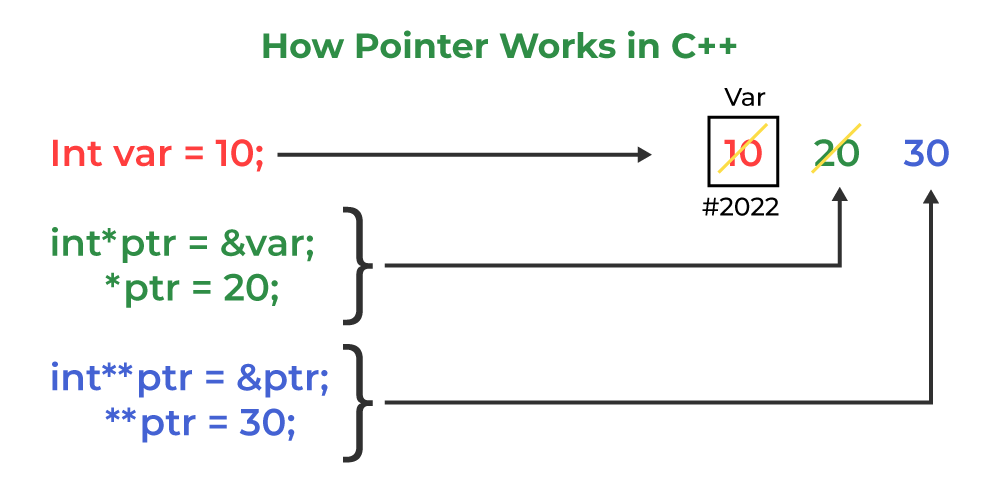
This note mainly covers the knowledge points of pointers and arrays in C++.
Pointers
Basic Concepts
A pointer (指针) is an important concept in programming languages. A pointer stores a memory address and provides direct access to data in memory. Important things bear repeating three times.
The value of a pointer is an address! The value of a pointer is an address! The value of a pointer is an address!
The value stored at the address pointed to by the pointer—that is the actual data. To understand it intuitively: a pointer is like a house number, and we use the house number to refer to the person living inside.
Declaration and Usage
The syntax for declaring a pointer to a variable of a certain type is:
type * ptr;

// or type* ptr;
// or type *ptr;
All three formats above are legal and express exactly the same meaning. Formally, type* emphasizes that ptr's type is a pointer, while type * emphasizes that (ptr)'s type is type. The operator () is overloaded here to indicate that the variable (ptr) is a pointer.
For example, to declare a pointer to an int variable:
double *ptr;
Note that although a pointer's value is an address, and this address can usually be treated as an integer, a pointer is not an integer type. Integer types can be added, subtracted, multiplied, and divided; addresses might be added or subtracted, but multiplying or dividing two addresses has no meaning. Therefore, simply assigning an integer to a pointer is meaningless. However, you can make it meaningful through type casting.
int *pt;
// pt = 0xB8000000; // type mismatch error
pt = (int *)0xB8000000; // type match
Address Operator &
For a value variable, we can use & to expose its address. Then we can assign that address to a pointer.
int *ptr;
int value = 5;
ptr = &value;
After that, the following values will be consistent.
*ptr == value;
ptr == &value;
Using Pointers to Record Allocated Memory Locations
The limitation of using the address operator (&) is that the pointer must have a corresponding value variable. Value variables are allocated memory by the program at declaration time, but often the pointers we use are not paired with a value type. At runtime, we can manually allocate memory on the heap and then use a pointer to point to that heap location.
In C, we commonly use the library function malloc(). In C++, malloc() can also be used, but the new keyword is used more often. For example:
int *ptr = new int;

// C type
// int *ptr = (int *)malloc(sizeof(int));
// or if you know sizeof(int) == 4
// int *ptr = (int *)malloc(4);
Here, new is followed by the type keyword int, then new finds a memory block of the correct length and returns that block's address, which is assigned as ptr's value. For the malloc function, you must manually set the size of int and perform proper type casting, otherwise the pointer may not operate according to that value's type (we will discuss this in detail later).
In C/C++, once we request a new memory block with new (or malloc), we must release it when it is no longer needed, otherwise a Memory Leak (内存泄漏) will occur. The corresponding release methods are: new pairs with delete, malloc pairs with free. They must be used in matching pairs—for every new there must be a delete, for every malloc there must be a free.
int *ptr = new int;
//... after some codes using int
delete ptr;
Note that what we release is the memory block, not the pointer. The variable ptr still exists and cannot be redeclared. It can be pointed to a new memory block.
Also, do not attempt to release memory that has already been released—the result in C++ is undefined. Nor can you use delete to release memory obtained from declared variables (the address corresponding to the & operator).
Arrays
Creation and Release
Static Arrays
In C++, creating a static array is simple.
typeName arrayName [arraySize];
Here arraySize cannot be a variable; it must be a constant or a value marked as const. Therefore, we say this array is static.
Examples of static array declaration and initialization are shown below. Any of these formats can be used.
int cards[4] = {3, 4, 5, 6};
int hands[] = {3, 4, 5, 6}; // compiler will automatically count the size of the array

float balance[100] {}; // all elements set to 0;
double earnings[4] {1, 2, 3, 4};
Dynamic Arrays
In C++, if you create an array using the static array method above, memory will be allocated for it when the program is compiled. Whether the program will use the array or not, it will occupy memory. This memory allocation strategy is called Static binding (静态联编).
In contrast, we can also use the new keyword to create a dynamic array. Dynamic arrays participate in dynamic binding; they are added to the program at compile time, and the program will determine their length at runtime. When they are no longer needed, release them with delete followed by square brackets.
int *parray = new int[10];
// ... after some codes using parray
delete[] parray;
Here, the [] in delete[] tells the program we should release the entire array, not just the element pointed to by parray (the address of the first element in the array). Note that we use the pointer operator (*) to identify the address of the array's first element.
Pointer Arithmetic
In C/C++, pointers and arrays are essentially equivalent. This is due to pointer arithmetic.
Definition
For a pointer p of type T, suppose p points to address X. Then we have the following two identities:
1. *(p+i) == X + sizeof(T) * i;
2. *(&Expr) == Expr;
Example: suppose we have the following array.
int A[5] = {1,2,3,4,5};
Then, we write the output results in the comments below.
cout << A;
// 0x7ffd9a04f880

cout << A[0];
// 1

cout << *A;
// 1

cout << &A[0];
// 0x7ffd9a04f880

cout << A+1;
// 0x7ffd9a04f884

cout << A[1];
// 2

cout << *(A+1);
// 2

cout << &A[1];
// 0x7ffd9a04f884

cout << &A[0] + sizeof(int) * 1;
// 0x7ffd9a04f884
In this way, we understand the relationship between arrays and pointers. C++ interprets the array name as a pointer. In other words, it interprets the array name as the address of the first element. It interprets A[i] as *(A+i).
Array Address
When taking the address of the entire array, the array name is not interpreted as its address, but as the address of the entire array.
This is a bit convoluted, but we can understand it through this example.
short B[10];
B is a short array of length 10. Assuming each short is 2 bytes, B occupies 20 bytes of space.
At this point:
- B+1: adds 2 to the address value (from B's address value).
- &B + 1: adds 20 to the address value.